Color Points Connection Legend1.2
Publisher Description


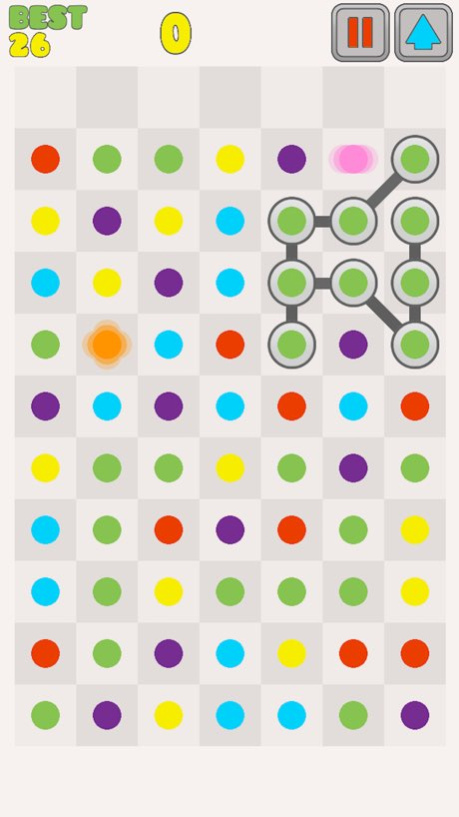
A very addictive swipe elimination game, don't miss it! You swipe groups of 3 or more same colour dots. Swipe as many groups as possible until one column reaches the top of the screen. Gear up for this entertaining and casual game and you won't be able to put this game down for hours.
Tip:
Long chain will give you bonus score.
Features:
Fun of swiping.
Very cute and clean graphics.
High quality sound effects.
Game Center leaderboards.
Endless game, unlimited fun.
Retina display optimised.
Universal game: iPhone, iPad, iPod Touch.
Enjoy!
www.miaosoft.com
http://www.facebook.com/Miaosoft
http://www.twitter.com/miaosoft
http://www.youtube.com/miaosoft
Version History Performance improvement.
Minor bug fixes. 1.2 01/19/2018 Minor bug fixes.
Change game name. 1.1 01/11/2016 1.0 07/07/2013
About Color Points Connection Legend
The company that develops Color Points Connection Legend is Adam Xiao. The latest version released by its developer is 1.2.
To install Color Points Connection Legend on your iOS device, just click the green Continue To App button above to start the installation process. The app is listed on our website since 2026-10-14 and was downloaded 8 times. We have already checked if the download link is safe, however for your own protection we recommend that you scan the downloaded app with your antivirus. Your antivirus may detect the Color Points Connection Legend as malware if the download link is broken.
How to install Color Points Connection Legend on your iOS device:
- Click on the Continue To App button on our website. This will redirect you to the App Store.
- Once the Color Points Connection Legend is shown in the iTunes listing of your iOS device, you can start its download and installation. Tap on the GET button to the right of the app to start downloading it.
- If you are not logged-in the iOS appstore app, you'll be prompted for your your Apple ID and/or password.
- After Color Points Connection Legend is downloaded, you'll see an INSTALL button to the right. Tap on it to start the actual installation of the iOS app.
- Once installation is finished you can tap on the OPEN button to start it. Its icon will also be added to your device home screen.
Program Details
System requirements
Download information
Pricing
Version History
version 1.2
posted on 2026-10-14
Version History Performance improvement.
Minor bug fixes. 1.2 01/19/2018 Minor bug fixes.
Change game name. 1.1 01/11/2016 1.0 07/07/2013
version 1.2
posted on 2026-09-06
Version History This app has been updated by Apple to prepare for watchOS 27 compatibility. No new features are included.
Performance improvement.
Minor bug fixes. 1.2 01/19/2018 Minor bug fixes.
Change game name. 1.1 01/11/2016 1.0 07/07/2013
version 1.2
posted on 2026-08-11
Version History This update from Apple will improve the functionality of this app. No new features are included.
Performance improvement.
Minor bug fixes. 1.2 01/19/2018 Minor bug fixes.
Change game name. 1.1 01/11/2016 1.0 07/07/2013
version 1.2
posted on 2020-01-20
19 janv. 2018 Version 1.2
Performance improvement.
Minor bug fixes.
version 1.2
posted on 2018-01-19
Jan 19, 2018
Version 1.2
This app has been updated by Apple to display the Apple Watch app icon.
Performance improvement.
Minor bug fixes.
version 1.2
posted on 2018-01-19
Jan 19, 2018 Version 1.2
Performance improvement.
Minor bug fixes.
version 1.2
posted on 2018-01-19
19 Jan 2018 Version 1.2
Performance improvement.
Minor bug fixes.
version 1.2
posted on 2018-01-19
Jan 19, 2018 Version 1.2
This app has been updated by Apple to use the latest Apple signing certificate.
Performance improvement.
Minor bug fixes.
version 1.2
posted on 2018-01-19
This app has been updated by Apple to display the Apple Watch app icon.
Performance improvement.
Minor bug fixes.
